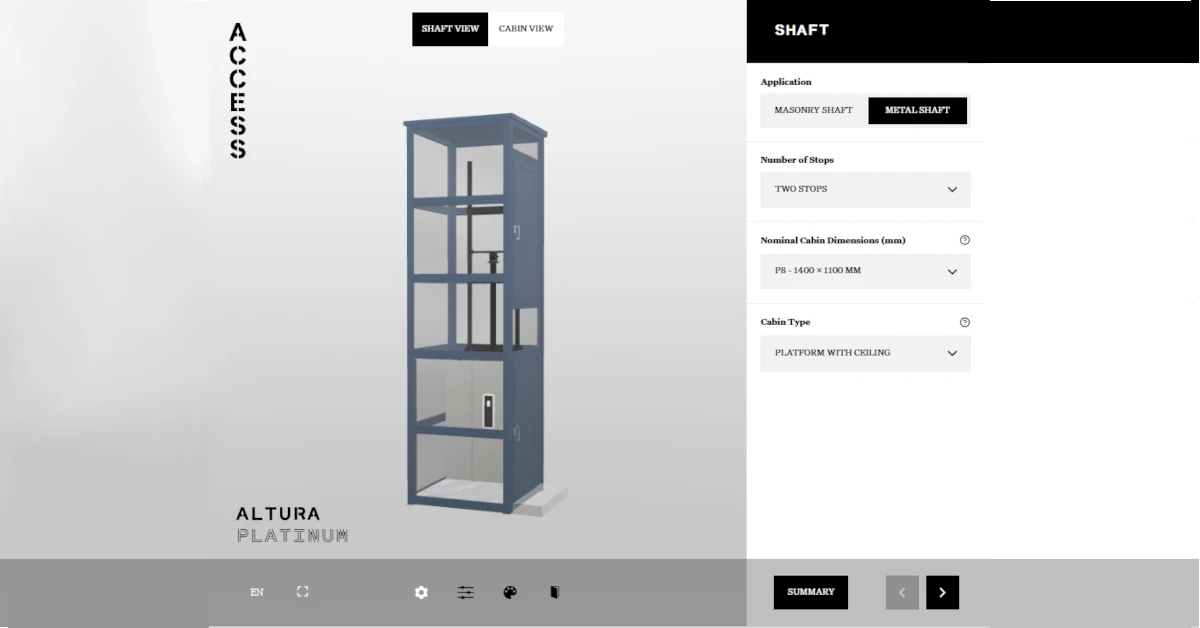
Access BDD’s Altura Configurator is a web-based tool that allows you to design, customise, and visualise your own home lift. With the Altura Configurator, you can choose from a wide range of options, including lift type, colour, upholstery, and accessories, to create a lift that meets your specific needs and beautiful blends int your home. The tool is designed to be user-friendly and intuitive, making it easy for anyone to use, regardless of your technical expertise.
Altura Configurator Overview
The Altura Configurator is a powerful tool that allows you to design and customise your own lifts. The tool is web-based, which means that you can access it from anywhere, at any time, using any device with an internet connection. The tool is designed to be user-friendly and intuitive, with a simple and easy-to-use interface that makes it easy for anyone to use.
Overall, the Altura Configurator is a powerful and user-friendly tool that makes it easy to design your own home lift. Whether you’re looking for a lift that is sleek and modern or traditional and elegant, our configurator has everything you need to create the perfect lift for your home.
Key Takeaways
- Altura Configurator is a web-based tool that allows you to design, customise, and visualise your own stairlifts, homelifts, and platform lifts.
- The Altura Configurator is user-friendly and intuitive, with a simple and easy-to-use interface that makes it easy for anyone to use.
- The tool has a range of pre-designed lift configurations that you can use as a starting point, allowing you to create a lift that is truly unique.
Configurator Features
The Altura Configurator offers a wide range of features that make designing your home lift easy and intuitive. Some of the key features include:
- Customisable dimensions: You can adjust the height, width, and depth of your lift to fit your specific requirements.
- Styling options: You can choose from a variety of colours, finishes, and materials to match your lift to your home decor.
- Accessibility options: You can add features such as handrails, seat belts, and emergency stop buttons to ensure that your lift is safe and accessible for everyone in your household.
- Preview mode: You can preview your lift in 3D to get a realistic idea of how it will look in your home.

System Requirements
To use the Altura Configurator, you will need a device with an internet connection and a web browser that supports WebGL. This includes most modern desktop and mobile browsers, such as Google Chrome, Mozilla Firefox, and Safari.
Getting Inspiration
If you’re not sure where to start, the Altura Configurator has a range of pre-designed lift configurations that you can use as a starting point. These pre-designed configurations can be customised, allowing you to create a lift that is truly unique.
When it comes to designing a home lift, it can be challenging to know where to start. However, there are several ways to find inspiration for your home lift design. Here are some tips that we think can help:
1. Look at Our Gallery
Our Altura gallery is a great place to start when looking for inspiration. We have a wide range of images showcasing our previous projects, which can help you get an idea of what you want. You can browse through the gallery and see what catches your eye. From there, you can start to think about what you want for your home lift design.
2. Consider Your Home Décor
Another way to find inspiration for your home lift design is to consider your home décor. Think about the colours, textures, and materials that you have used in your home. You can use these elements as a starting point for your lift design. For example, if you have a lot of natural wood in your home, you may want to incorporate this into your lift design.
3. Think About Your Lifestyle
Your lifestyle can also be a source of inspiration for your home lift design. Do you have any hobbies or interests that you want to showcase in your home? For example, if you are a music lover, you may want to incorporate a music theme into your lift design. Alternatively, if you have a large family, you may want to consider a lift design that is spacious enough to accommodate everyone.
4. Get Creative
Finally, don’t be afraid to get creative with your home lift design. The Altura Configurator allows you to customise your lift in a variety of ways, so you can create a design that is truly unique to you. You can experiment with different colours, materials, and finishes until you find a combination that you love.
By following these tips, you should be able to find inspiration for your home lift design. Remember, the most important thing is to create a design that is functional, stylish, and reflects your personal taste and lifestyle.
Using the Altura Configurator
If you’re looking to create a customised home lift, the Altura Configurator is the perfect tool for you. Here’s everything you need to know about using the Altura Configurator.
Initial Configuration
The first step to using the Altura Configurator is to select your lift model. You can choose from the Altura Diamond or the Altura Platinum. Once you’ve selected your model, you can choose the size of your lift and the number of floors you require.
Creating Configurations
Once you’ve completed the initial configuration, you can start creating your customised lift. The Altura Configurator allows you to choose from a range of options, including the lift’s interior and exterior finishes, lighting, and accessories. You can also choose the type of door you want for your lift, as well as the type of drive system.
To make things even easier, the Altura Configurator provides you with a 3D visualisation of your lift as you create it. This allows you to see exactly how your lift will look before you finalise your configuration.
Saving A Project
Once you’ve created your customised lift configuration, you can see the details. At this point it would be a good idea to save it as a ‘project’. Take a copy of the screen or indeed complete the form at the end. This allows you to save your configuration and share it with others, such as your architect or builder, to get your input.
Overall, the Altura Configurator is a powerful tool that allows you to create a customised home lift that meets your exact needs. With its easy-to-use interface and 3D visualisation, it’s the perfect way to design your dream lift.
Troubleshooting and Support
If you experience any technical difficulties while using the configurator, the first thing to do is to check your internet connection. A poor internet connection can cause slow loading times and may affect the performance of the configurator. If your internet connection is stable and you are still experiencing issues, you can contact our support team for assistance.
We are committed to providing our customers with the best possible support and assistance. If you encounter any issues while using our configurator, please do not hesitate to contact us. We are here to help you.
We hope you have fun using the Altura Configurator. When you’re ready to discuss your project, feel free to get in touch.